원리가 뒤에서 부터 넣어주는건데


[0, 1, 2, 3, 4, 5, 6] 이면


rnd에서 나온 값이 인덱스가 되고, 그 인덱스에 6의 값이 가며 그 인덱스의 값으로 6으로 간다

중첩이 되어도 어차피 마지막부터 오는거니까 결국은 list 안에서 한번씩은 섞이게 되는 것!

유용할 것 같아서 정리

public static class MyExtensions
{
	//Fisher - Yates shuffle
	public static void Shuffle<T>(this IList<T> list)
	{
		for (int i = list.Count - 1; i > 0; i--)
		{
			int rnd = UnityEngine.Random.Range(0,i);
			T temp = list[i];
			list[i] = list[rnd];
			list[rnd] = temp;
		}
	}


'C# > c#' 카테고리의 다른 글

c# 코루틴(Coroutine, IEnumerator, yield), 코루틴 중단이 안될 때  (0) 2022.01.27
c# Linq 쿼리  (0) 2022.01.26

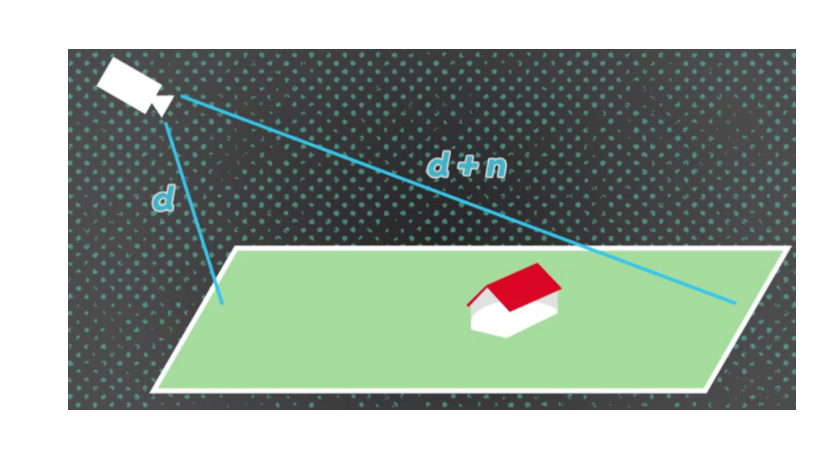
ScreenPointToRay는 기본적으로 카메라 위치에서 마우스 방향을 가리키는 광선을 한다.


ScreenToWorldPoint 포인트는 실제로 마우스 아래의 3D 위치를 반환한다.

Vector3 p = camera.ScreenToWorldPoint(new Vector(Input.mousposition.x, 100, camera.nearClipPlane))

가장 이해하기 쉬운 그림이다.
이처럼 카메라와의 높이? 때문에 camera.nearClipPlane  사용한다.

깊이감이 필요한 클릭이라면 레이로 거리 계산을 통해 하는게 좋지만
레이 자체가 정보가 많아 무겁고, 콜라이더도 활용해야 하기 때문에
ScreenToWorldPoint
클릭한 화면의 좌표의 비율을 계산해서 덜 무겁고 활용하기 좋을것 같다.


https://funfunhanblog.tistory.com/24


유니티) ScreenPointToRay 카메라로 부터의 스크린의 점

Camera.ScreenPointToRay 카메라로 부터의 스크린의 점을 통해 레이를 반환합니다. 스크린공간은 픽셀로 정의되며. 픽셀단위 1번 : 왼쪽 하단의 화면이 (0,0) 2번: 오른쪽 상단이 (pixelWidth,pixelHeight) if (In..

funfunhanblog.tistory.com

https://docs.unity3d.com/ScriptReference/Camera.ScreenToWorldPoint.html


Unity - Scripting API: Camera.ScreenToWorldPoint

World space coordinates can still be calculated even when provided as an off-screen coordinate, for example for instantiating an off-screen object near a specific corner of the screen. Screenspace is defined in pixels. The bottom-left of the screen is (0,0

docs.unity3d.com

https://luv-n-interest.tistory.com/828


마우스 입력 받아서 이용하는 4가지 방법[Unity]

마우스는 스크린에 있지만 이용하려면 WorldSpace로 변환하던가.. 무엇인가 해야하는 상황이 있다. 마우스 입력을 받아서 이용하는 방법에 대해 알아보자. 0 번째 방법 Input.mousePosition 얘는 그냥 Scre

luv-n-interest.tistory.com

https://gamedev.stackexchange.com/questions/158633/difference-between-unitys-camera-screenpointtoray-and-camera-screentoworldpoint


Difference between Unity's Camera.ScreenPointToRay and Camera.ScreenToWorldPoint?

What is the difference between Unity's Camera.ScreenPointToRay and Camera.ScreenToWorldPoint. And where we can use these. I've watched some tutorial and documentation but I didn't get a clear

gamedev.stackexchange.com

https://m.blog.naver.com/PostView.naver?isHttpsRedirect=true&blogId=dlwhdgur20&logNo=220033708116 


[Unity3D] Camera.ScreenToWorldPoint

Camera.ScreenToWorldPoint Vector3 ScreenToWorldPoint(Vector3 position); 게임 화면(Screen...

blog.naver.com


'Unity' 카테고리의 다른 글

추가 정리할 목록들  (0) 2022.02.14
Unity 호출순  (0) 2022.01.26
Unity Collider(Collision, Trigger 차이)  (0) 2022.01.21
Unity 드래그 앤 드롭(Drag&Drop)  (0) 2022.01.18

Unity

  • Light Bake 최적화

https://dawnhillfrog.tistory.com/5

https://m.blog.naver.com/PostView.nhn?isHttpsRedirect=true&blogId=antodanfdy&logNo=222228176798&categoryNo=44&proxyReferer=

https://learnandcreate.tistory.com/524

https://funfunhanblog.tistory.com/94


  • Nav Mesh

NavMeshAgent

https://ansohxxn.github.io/unitydocs/navmeshagent/

NavMeshAgent.path

https://docs.unity3d.com/ScriptReference/AI.NavMeshAgent-path.html

NavMesh.path

https://docs.unity3d.com/ScriptReference/AI.NavMeshPath.html


https://docs.unity3d.com/ScriptReference/AI.NavMeshPath.html

https://docs.unity3d.com/ScriptReference/AI.NavMeshAgent-path.html

https://ansohxxn.github.io/unitydocs/navmeshagent/


  • 원자 회전처럼 RotateAround활용해서 주변 회전하기 + 회전과 유니티 메트릭스의 관계, 사용방안? 

Transform.Rotate(new Vector3(45,45,45)) 메서드 안에 들어가는 벡터의 성분은 각도를 가리킨다.

형식은 벡터이지만 각도를 뜻한다. = 45는 각도를 가리키고

Transform.Rotate = Quaterninon.LookRotation(new Vector3(45,45,45)) 메서드 안에 들어가는 벡터는 실제 벡터이고,

45는 x,y,z 값을 뜻한다.

Transform.Rotate = Quaterninon.LookRotation(new Vector3(45,45,45)) 와

Transform.Rotate = Quaterninon.LookRotation(new Vector3(1, 1, 1))과 같은 결과를 나타낸다. 

https://m.blog.naver.com/PostView.naver?blogId=happybaby56&logNo=221324341865&proxyReferer=


+ 유니티 다양한 rotation 

https://ssabi.tistory.com/24


  • 에디터모드 활용해서 나만의 에셋만들기(Camear, RanderTexture활용해서 런타임하지 않고

렌더링이미지를 JPG로 저장하기 - 협업 때 유니티 활용이 버거운 다른 부서를 위해 사용가능)

EitorWindow : https://m.blog.naver.com/PostView.naver?isHttpsRedirect=true&blogId=hammerimpact&logNo=220774325360  - 되게 자세히 설명

https://m.blog.naver.com/PostView.naver?isHttpsRedirect=true&blogId=cdw0424&logNo=221532902606- 간단히 설명

ScriptableWizard - monobehavior

https://docs.unity3d.com/ScriptReference/ScriptableWizard.html


  • RanderTexture 사용법

https://funfunhanblog.tistory.com/209


  • UI Button Event Trigger

버튼 눌렀을 때, 누르고 있을 때, 이벤트가 끝났을 때

https://coderzero.tistory.com/entry/%EC%9C%A0%EB%8B%88%ED%8B%B0-%EB%A7%A4%EB%89%B4%EC%96%BC-UI-Button-%EA%B3%84%EC%86%8D-%EB%88%84%EB%A5%B4%EA%B3%A0-%EC%9E%88%EB%8A%94-%EC%83%81%ED%83%9C-%ED%99%95%EC%9D%B8


  • 마우스 이벤트, 드래그 앤 드롭

https://ansohxxn.github.io/unity%20lesson%203/ch5-3/


  • 카메라 설정 camera 3d -> 2d

https://fiftiesstudy.tistory.com/260


  • 미니맵을 구현하고 캐릭터 움직이면 실시간 이동 표시,미니맵을 클릭하면 해당 좌표로 캐릭터 이동

- Camera.ScreenToWorldPoint, NavMeshPath 설정

https://docs.unity3d.com/kr/530/ScriptReference/Camera.ScreenToWorldPoint.html

C#

  • break와 continue


  • foreach와 그 활용


  • enum 활용


  • type변환, 문자열 변환


  • where, is, in, as


 Queue<T> . 이 코드 예제에서는 기본 용량을 사용 하 여 문자열 큐를 만들고 메서드를 사용하여 Enqueue 5 개의 문자열을 큐에 대기 합니다.

using System;
using System.Collections.Generic;

class Example
{
    public static void Main()
    {
        Queue<string> numbers = new Queue<string>();
        numbers.Enqueue("one");
        numbers.Enqueue("two");
        numbers.Enqueue("three");
        numbers.Enqueue("four");
        numbers.Enqueue("five");
        -----------------------------------
        foreach( string number in numbers )
        {
            Console.WriteLine(number); 
        } //출력물 
      } 	one,two,three,four,five
}


Dequeue메서드는 첫 번째 문자열을 큐에서 제거 하는 데 사용 됩니다. 

Peek메서드는 큐의 다음 항목을 확인 하는 데 사용 되며, 메서드를 사용 하 여 큐를 제거 Dequeue 합니다.

Console.WriteLine("\nDequeuing '{0}'", numbers.Dequeue());
Console.WriteLine("Peek at next item to dequeue: {0}", numbers.Peek());
Console.WriteLine("Dequeuing '{0}'", numbers.Dequeue());
//출력물
Dequeuing 'one'
Peek at next item to dequeue: two  <- one을 제거했으니 two가 된다
Dequeuing 'two'


ToArray메서드는 배열을 만들고 큐 요소를 복사 하는 데 사용 되며,

이 배열은 Queue<T> IEnumerable<T> 큐의 복사본을 만드는 데 사용 하는 생성자에 전달 됩니다. 복사본의 요소가 표시 됩니다.

Queue<string> queueCopy = new Queue<string>(numbers.ToArray());
numbers의 배열을 ToArry로 복사해서 queueCopy로 생성자에 전달된다.
Console.WriteLine("\nContents of the first copy:");
foreach( string number in queueCopy )
{
   Console.WriteLine(number);
}  // 출력물
	Contents of the copy:
	three, four, five


큐 크기의 두 배 배열을 만들고, CopyTo 메서드를 사용 하 여 배열 중간에서 시작 하는 배열 요소를 복사 합니다. Queue<T>생성자는 처음에 세 개의 null 요소가 포함 된 큐의 두 번째 복사본을 만드는 데 다시 사용 됩니다.

string[] array2 = new string[numbers.Count * 2];// numbers의 2배 = 6개
numbers.CopyTo(array2, numbers.Count); // CopyTo (T[] array, int arrayIndex);
배열간의 요소(array2)를 복사해서 numbers.Count 인덱스 부터 복사가 시작된다.(중간에서 시작)

Queue<string> queueCopy2 = new Queue<string>(array2); // 
처음 세 개의 null 요소가 포함된 큐 queueCopy2를 만든다.
Console.WriteLine("\nContents of the second copy, with duplicates and nulls:");
//Contents of the second copy, with duplicates and nulls:
foreach( string number in queueCopy2 )
{
    Console.WriteLine(number);
}	//출력물
	(앞에 3개는 null로 빈칸) three, four, five

Queue<T>.CopyTo(T[] arry, Int arrayIndex)


arrayT[]

Array에서 복사한 요소의 대상인 일차원 Queue<T>입니다. Array에는 0부터 시작하는 인덱스가 있어야 합니다.

arrayIndexInt32

array에서 복사가 시작되는 0부터 시작하는 인덱스입니다.

public void CopyTo (T[] array, int arrayIndex);


Contains메서드는 큐의 첫 번째 복사본에 "4" 라는 문자열이 있음을 표시 하는 데 사용 되며, 그 후에는 Clear 메서드가 복사본을 지우고 Count 속성은 큐가 비어 있음을 표시 합니다.

Console.WriteLine("\nqueueCopy.Contains(\"four\") = {0}", queueCopy.Contains("four"));

Console.WriteLine("\nqueueCopy.Clear()");
queueCopy.Clear();
Console.WriteLine("\nqueueCopy.Count = {0}", queueCopy.Count);
// 출력물
queueCopy.Contains("four") = True
queueCopy.Clear()
queueCopy.Count = 0

Queue<T>.Contains(T item)

itemT

Queue<T>에서 찾을 개체입니다. 참조 형식에 대해 값은 null이 될 수 있습니다.

반환

Boolean

true가 item에 있으면 Queue<T>이고, 그렇지 않으면 false입니다.
+ Recent posts